

How to run Top 50
- Go to Talent database → Start a new search (cutshort.io/profile/candidate-search/new). You can also open a saved search.
- Set the role and your mandatory requirements. Top 50 only keeps people who match all of those.
- Flip the toggle from All relevant to Top 50. You can also start it from a talent card with Find Top-50 who match all.
- Wait while Cutshort reviews candidates. You will see a line like Found 12 · reviewed 80 candidates, then Successfully found top 50 after reviewing [N] most relevant candidates.
- Open a talent card to decide who to pursue. Use Edit criteria if the shortlist is too thin.
Export the shortlist to Google Sheets
After Top 50 finishes, click Export to google sheet. Confirm in the dialog — it tells you how many profiles will export and how many exports you have left this month. Google Sheet exports are used when you export searched candidates. ATS exports are free and are not counted in this usage. See How do I export searched candidates to a Google Sheet?.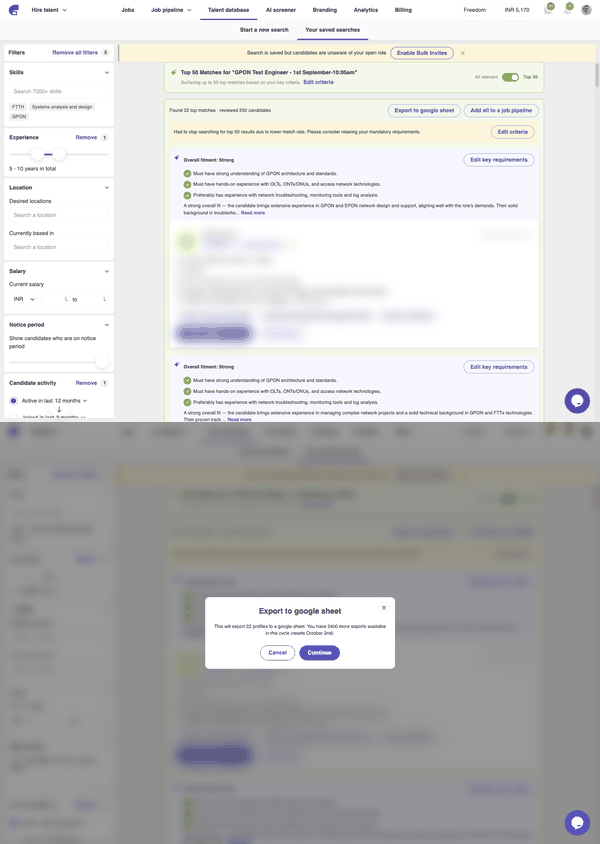
Locked profiles in the export use an unlock credit. If you do not have enough unlocks left, upgrade or export fewer profiles. See What happens when you unlock a talent card.
Add the shortlist to a job
After Top 50 finishes, click Add all to a job pipeline to invite everyone on the shortlist to apply. If you do not have a job yet, Cutshort asks you to Post a job first.If something goes wrong
- Out of AI credits — Top 50 uses AI credits. Freedom plans include 5,000 on the smallest plan and 10,000 on the others, each month. If you run out, you can buy more — email hire@cutshort.io. See What are AI credits on a Freedom plan?.
- No one matched every mandatory requirement — click Edit criteria, or switch back to All relevant.
- Had to stop searching due to lower match rate — relax a mandatory requirement and run Top 50 again.
- Changing filters — Cutshort will ask Discard top matches? Changing filters drops the current shortlist and switches back to all relevant candidates.
- Export says you have no Google Sheet exports left — wait until the month renews, or email hire@cutshort.io. ATS exports are not counted here.