

Before you start
You need:- A Breezy admin account with API access enabled
- Permission to create a personal access token in Breezy
1. Create an API key in Breezy
Use a personal access token (PAT). Do not use a session token from Breezy sign-in.- In Breezy, click your profile icon in the left sidebar.
- Click My Settings.
- Open the API Keys tab.
- Click + Create API Key.
- Name it something like
Cutshort. - Choose an expiration timeframe.
- Click Create Key.
- Copy the token immediately. Breezy shows it only once. It starts with
breezy_pat.
2. Add the key in Cutshort
- On Cutshort, open Settings → Integrations (cutshort.io/profile/hiring-settings/integrations).
- Under ATS integrations, choose Breezy HR.
- Paste the token in API key.
- Leave Company ID (optional) blank if you have one Breezy company. If you have more than one, you can pick the company later when you import a job.
- Click Connect ATS.
3. Import a job from Breezy
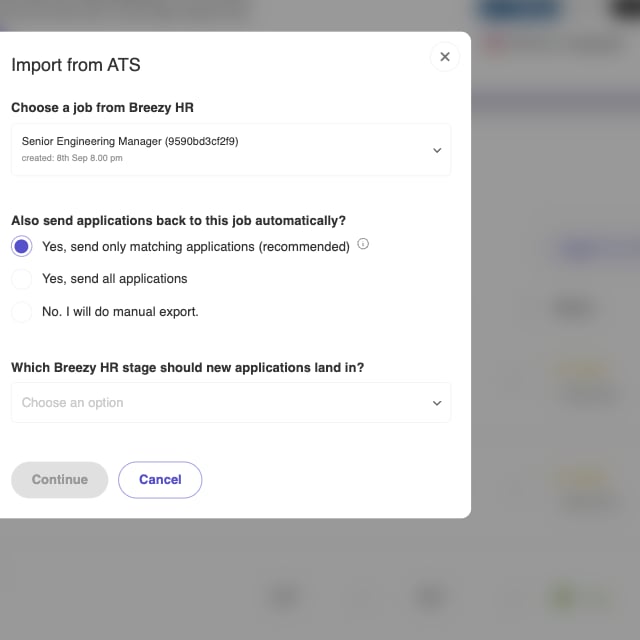
After Breezy is connected, Jobs (cutshort.io/profile/employer-dashboard) shows Import from ATS.
- Click Import from ATS.
- If you have more than one Breezy company, choose Breezy company.
- Choose a job from Breezy. Only published positions appear.
- Choose whether to send applications back automatically:
- Yes, send only matching applications (recommended)
- Yes, send all applications
- No. I will do manual export.
- If automatic export is on, choose which Breezy stage new applications should land in.
- Click Continue and finish job setup on Cutshort.
4. Export candidates from the pipeline
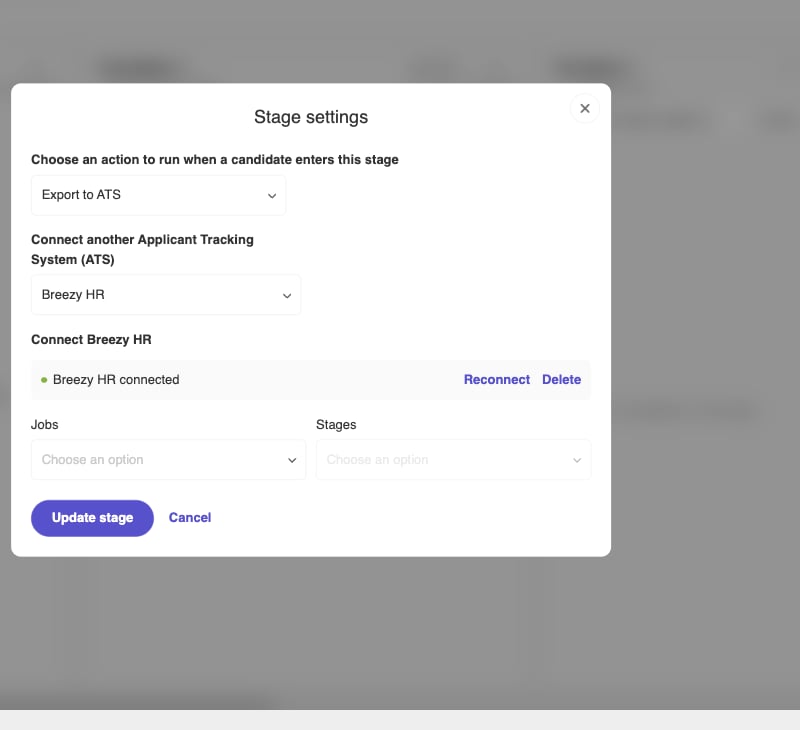
On any job pipeline (cutshort.io/profile/workflow), open a stage (click Automation is off or the stage name).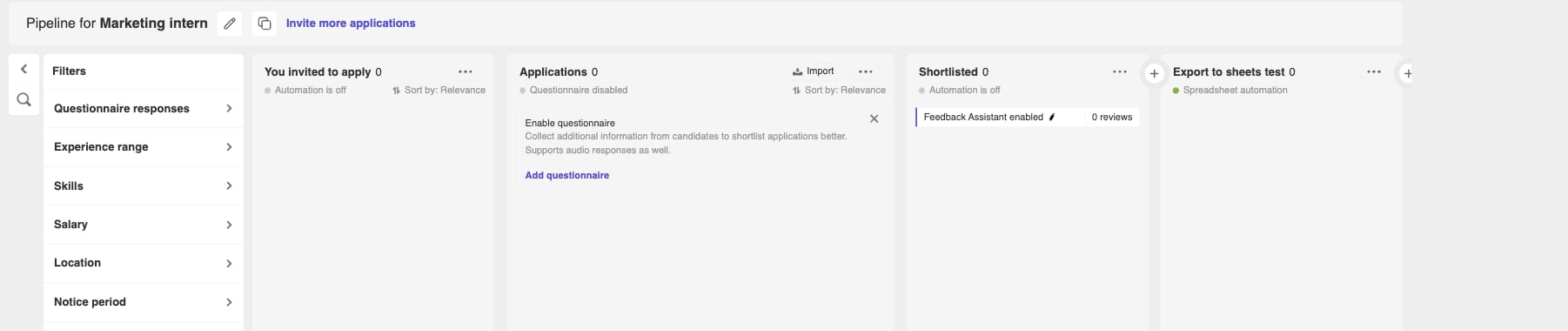
What Cutshort sends to Breezy
When a candidate is exported, Cutshort creates them on the Breezy position and attaches their resume. These fields are set:- Name
- Phone (if we have it)
- Origin — sourced
- Source — Cutshort
- Stage — the Breezy stage you selected
- Summary — experience, current and expected salary (INR), notice period, and the application highlight when available
- Resume file
If something goes wrong
- No API Keys tab in Breezy — your account may not have API access. A Breezy admin needs to enable it.
- Connect ATS fails — paste the full token, including the
breezy_patprefix. Create a new key if you closed the dialog without copying it. - No Breezy companies found — the token is tied to the Breezy user who created it. Use a key from someone who can see the company.
- No jobs listed — only published Breezy positions appear. Publish the role in Breezy, or pick another company if you have more than one.
- Multiple companies — choose Breezy company on Import, or enter Company ID when you connect.
- Export shows failed — confirm Breezy HR connected under Settings → Integrations, then check the stage still points at the right Breezy job and stage.
- Need to rotate the key — in Breezy, create a new PAT. In Cutshort, click Reconnect (or Delete, then connect again). Candidates already exported stay in Breezy.