> ## Documentation Index
> Fetch the complete documentation index at: https://docs.cutshort.io/llms.txt
> Use this file to discover all available pages before exploring further.
# How do I search relevant candidates on Cutshort?
> Start a talent search from a job description, set key requirements, add filters, and optionally run Top 50.
Go to **Talent database** → **Start a new search**, describe the role, set key requirements, then use filters or **Top 50** to get a shortlist you can act on.
## 1. Start a new search
Open [cutshort.io/profile/candidate-search/new](https://cutshort.io/profile/candidate-search/new), or use **Talent database** → **Start a new search**.
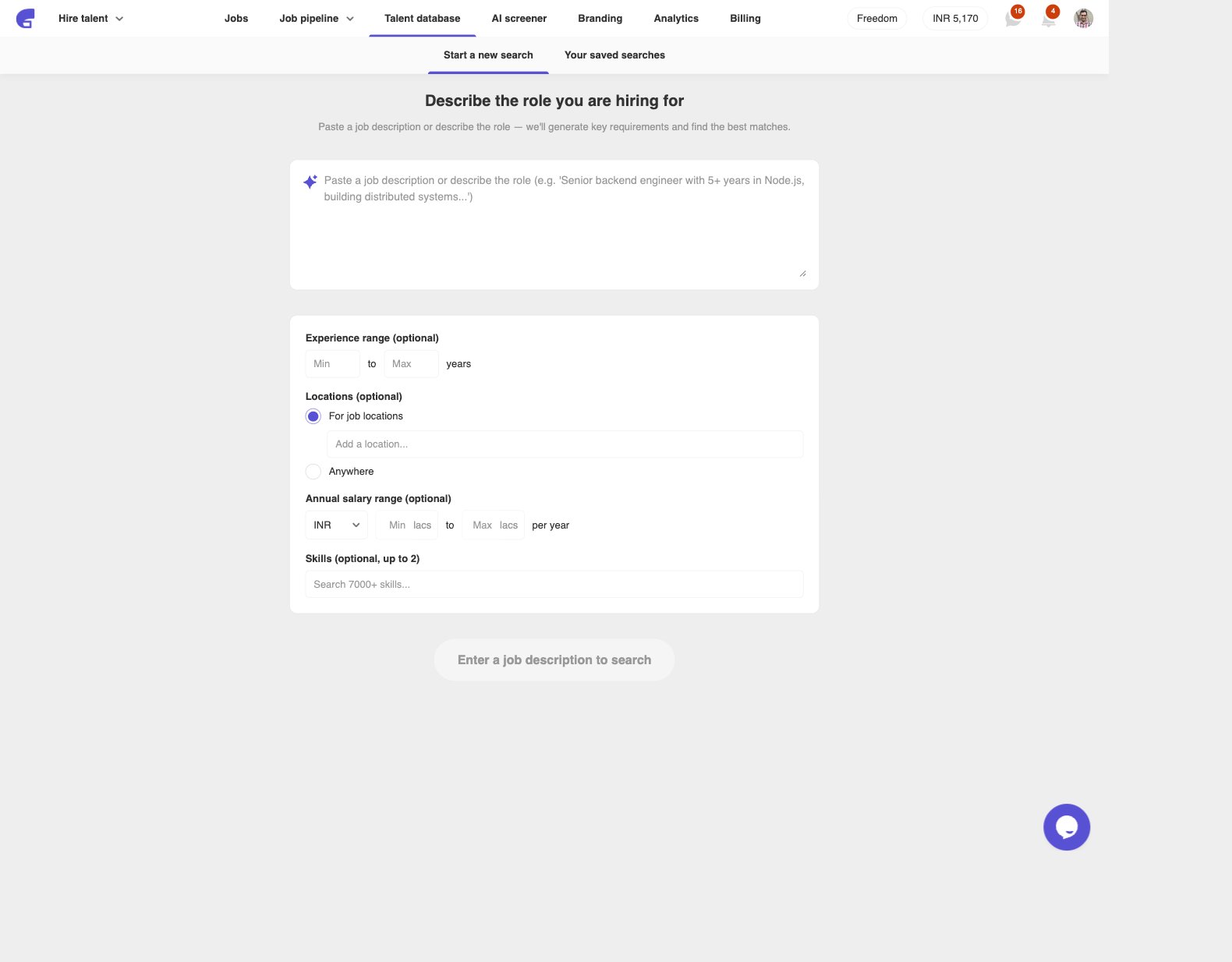 Paste a job description or write a short role brief in the box. You can also set optional hard filters here:
* **Experience range**
* **Locations** — **For job locations** or **Anywhere**
* **Annual salary range**
* **Skills** (up to 2)
Click **Search candidates**. The button stays disabled until the description is at least 50 characters.
## 2. Enter key requirements
Cutshort generates a first set of requirements from what you wrote. Edit them before the search starts.
Paste a job description or write a short role brief in the box. You can also set optional hard filters here:
* **Experience range**
* **Locations** — **For job locations** or **Anywhere**
* **Annual salary range**
* **Skills** (up to 2)
Click **Search candidates**. The button stays disabled until the description is at least 50 characters.
## 2. Enter key requirements
Cutshort generates a first set of requirements from what you wrote. Edit them before the search starts.
 Write anything you would expect to see on a resume, for example:
* Skills (Node.js, Figma, SQL)
* Kind of work done (built APIs, owned a growth funnel, shipped a mobile app)
* Team leading or management experience
* College tier
* Industry or domain (fintech, SaaS, healthcare)
Each line is auto-classified as **Mandatory** or **Preferred**. Use **+ Add a criterion** for anything missing. Click **Save and start search** when you are ready.
You can change these later from a talent card with **Edit key requirements**.
## 3. Tighten results with filters
The results page shows relevant candidates for this search. Use the left **Filters** panel to narrow the list.
Write anything you would expect to see on a resume, for example:
* Skills (Node.js, Figma, SQL)
* Kind of work done (built APIs, owned a growth funnel, shipped a mobile app)
* Team leading or management experience
* College tier
* Industry or domain (fintech, SaaS, healthcare)
Each line is auto-classified as **Mandatory** or **Preferred**. Use **+ Add a criterion** for anything missing. Click **Save and start search** when you are ready.
You can change these later from a talent card with **Edit key requirements**.
## 3. Tighten results with filters
The results page shows relevant candidates for this search. Use the left **Filters** panel to narrow the list.
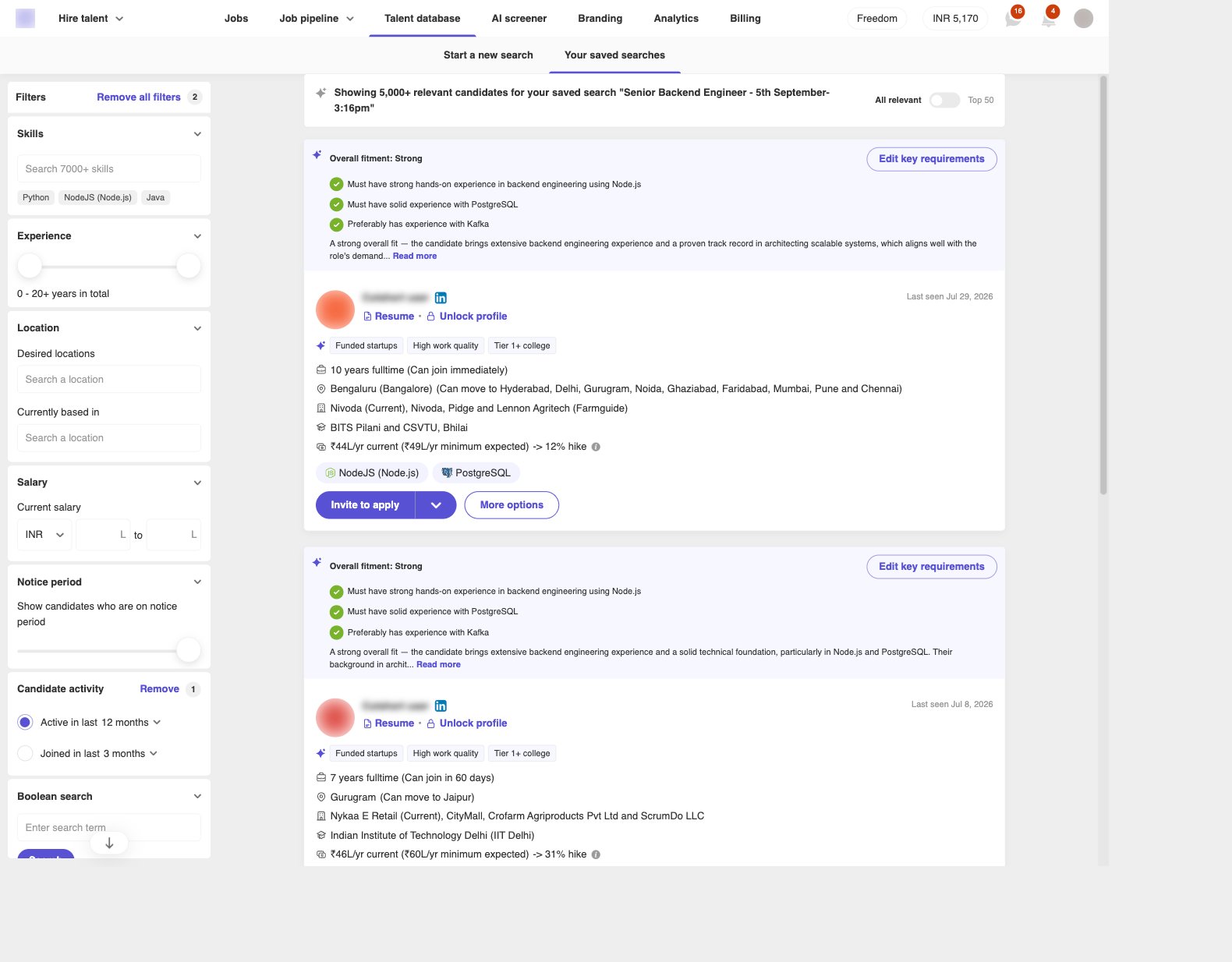 Common filters include:
* **Boolean search** — exact words from the resume (for example `(kafka OR "event-driven") AND node`)
* **Skills**
* **Experience**
* **Salary**
* **Location**
* **Notice period**
* **Industry**
* **Education pedigree**
* **Candidate activity**
**Remove all filters** clears the panel. Open a [talent card](/employers/what-is-a-talent-card) to read the resume before you unlock or invite.
## 4. Use Top 50 to shortlist
Flip the toggle from **All relevant** to **Top 50**. Cutshort reviews the search results against your key requirements and keeps people who match the mandatory ones.
Common filters include:
* **Boolean search** — exact words from the resume (for example `(kafka OR "event-driven") AND node`)
* **Skills**
* **Experience**
* **Salary**
* **Location**
* **Notice period**
* **Industry**
* **Education pedigree**
* **Candidate activity**
**Remove all filters** clears the panel. Open a [talent card](/employers/what-is-a-talent-card) to read the resume before you unlock or invite.
## 4. Use Top 50 to shortlist
Flip the toggle from **All relevant** to **Top 50**. Cutshort reviews the search results against your key requirements and keeps people who match the mandatory ones.
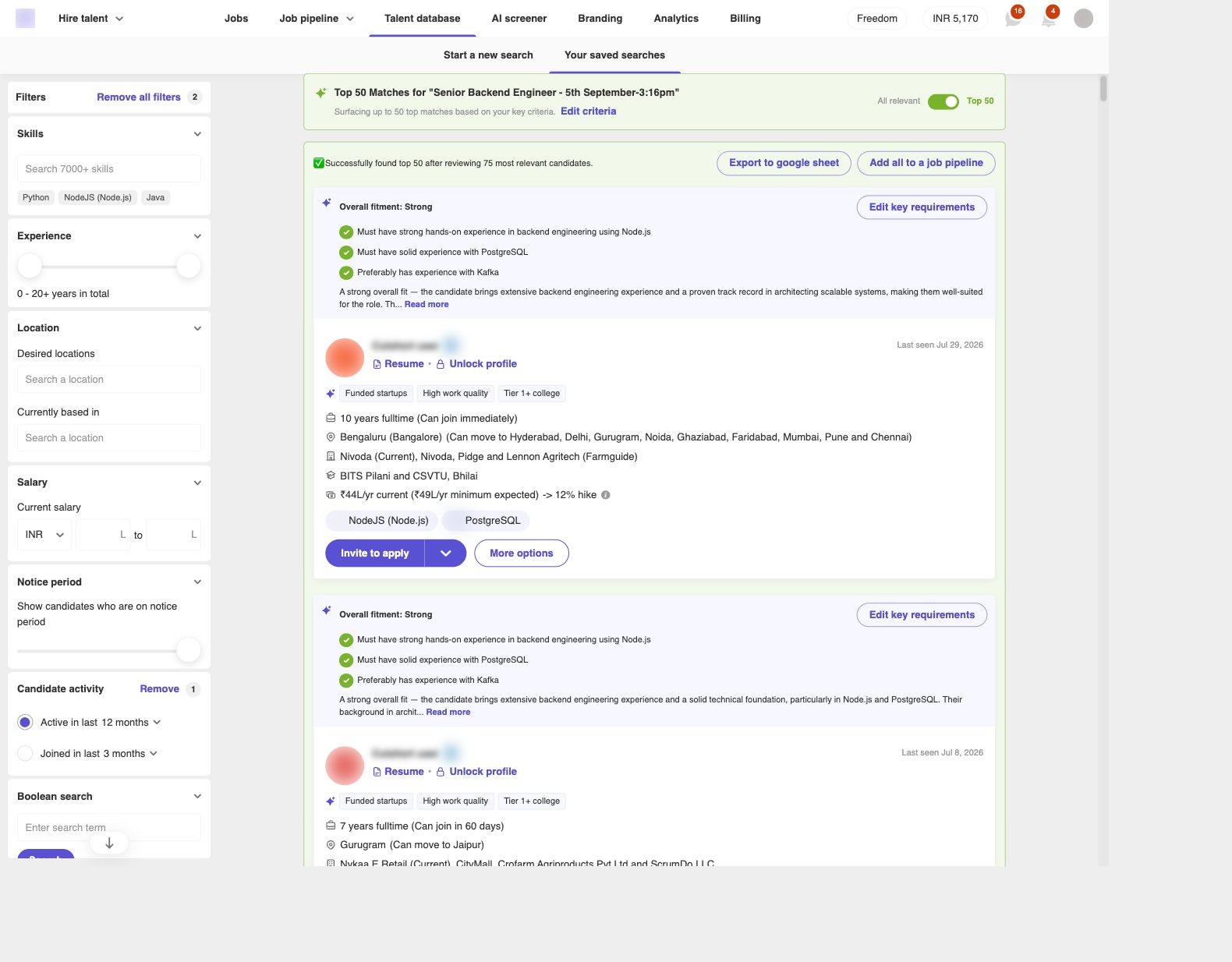 When it finishes you will see **Successfully found top 50 after reviewing \[N] most relevant candidates.** Then you can:
* **Export to google sheet**
* **Add all to a job pipeline**
For the full Top 50 flow, limits, and what to do if no one matches, see [How do I find Top 50 candidates who match all my requirements?](/employers/find-top-50-candidates).
## If something goes wrong
* **Search candidates is disabled** — add more detail to the role description (50+ characters).
* **Could not generate requirements** — add them with **+ Add a criterion**, or start the search without them.
* **List is too broad** — add a boolean, skill, location, salary, or notice-period filter, or turn on **Top 50**.
* **List is too thin** — remove a filter, or click **Edit criteria** / **Edit key requirements** and relax a mandatory line.
Something else? Chat with us on [cutshort.io](https://cutshort.io).
## Related
* [How do I find Top 50 candidates who match all my requirements?](/employers/find-top-50-candidates)
* [What is a Talent Card?](/employers/what-is-a-talent-card)
* [What happens when you unlock a talent card](/employers/unlock-talent-card)
When it finishes you will see **Successfully found top 50 after reviewing \[N] most relevant candidates.** Then you can:
* **Export to google sheet**
* **Add all to a job pipeline**
For the full Top 50 flow, limits, and what to do if no one matches, see [How do I find Top 50 candidates who match all my requirements?](/employers/find-top-50-candidates).
## If something goes wrong
* **Search candidates is disabled** — add more detail to the role description (50+ characters).
* **Could not generate requirements** — add them with **+ Add a criterion**, or start the search without them.
* **List is too broad** — add a boolean, skill, location, salary, or notice-period filter, or turn on **Top 50**.
* **List is too thin** — remove a filter, or click **Edit criteria** / **Edit key requirements** and relax a mandatory line.
Something else? Chat with us on [cutshort.io](https://cutshort.io).
## Related
* [How do I find Top 50 candidates who match all my requirements?](/employers/find-top-50-candidates)
* [What is a Talent Card?](/employers/what-is-a-talent-card)
* [What happens when you unlock a talent card](/employers/unlock-talent-card)