> ## Documentation Index
> Fetch the complete documentation index at: https://docs.cutshort.io/llms.txt
> Use this file to discover all available pages before exploring further.
# How do I connect Cutshort with Greenhouse ATS
> You can seamlessly check the top relevant candidates in your Greenhouse ATS
To connect Cutshort to Greenhouse ATS, you need:
* API access.
* assigned as Super Admin
**Not sure who on your team has admin access?**
You can see a complete list of users and their permissions by navigating to this page while signed in: [https://app2.greenhouse.io/in\_house\_contacts](https://app2.greenhouse.io/in_house_contacts)
**Don't have API Access?**
You can send instructions to a Greenhouse admin. Enter your colleague's name or email in the text box below.
**Step 1: Create an API key for Cutshort**
* Visit the [Greenhouse API Credentials](https://app.greenhouse.io/configure/dev_center/credentials) page and click **Create New API Key**.
* Select the *Harvest* API type
* In the description field, type "Cutshort"
* Select the Harvest option from the dropdown
* Click **Create**
* **Add permissions**
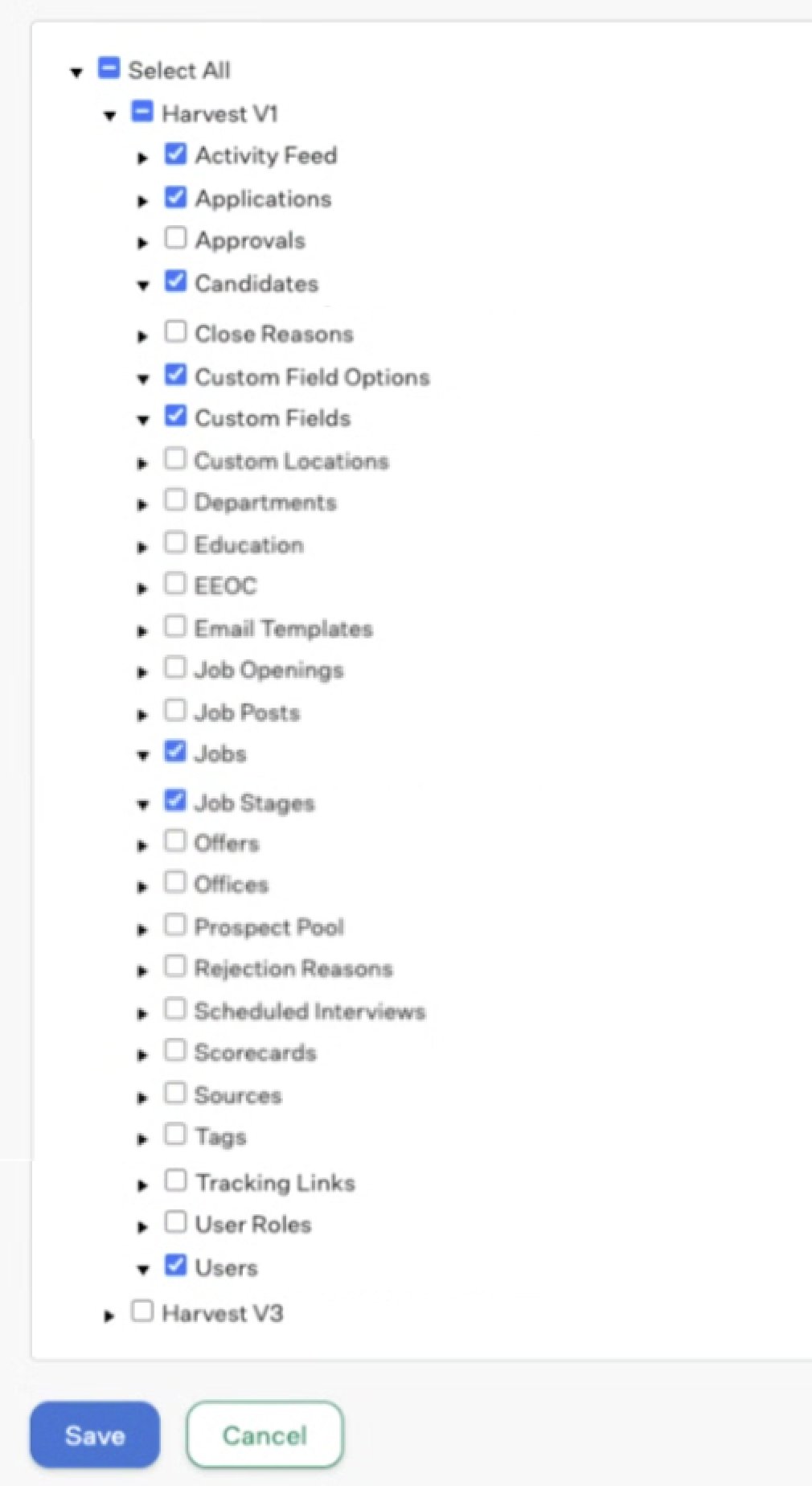
On the Manage API Key Permissions page, click '\*\*Select all'\*\***OR** choose the following permissions individually:
 \*\*Step 2: \*\*Copy this API key and go to Job Pipeline of the job you want to setup export to ATS on Cutshort.
Enter this key. Choose the job you want to export candidates to and you are done.
\*\*Step 3: \*\*When a candidate moves to a specific stage in CutShort (based on your automation rules), we:
* Create/update the candidate in Greenhouse
* Create an application linking the candidate to your job
* Attach the candidate's resume
* Populate custom fields with match scores, assessments, and screening responses
* Assign the application to the correct recruiter
4. Verification: We verify the export was successful using activity feed data
**Our Commitment to Security**
We understand that granting API access to your Greenhouse account is an important security decision.
Read-only access where possible - We only request write permissions where necessary for core functionality
No unnecessary data access - We only access data required for exporting candidates
Secure credential storage - Your API keys are encrypted and stored securely
* Transparent operations You can see exactly what we're doing with each permission
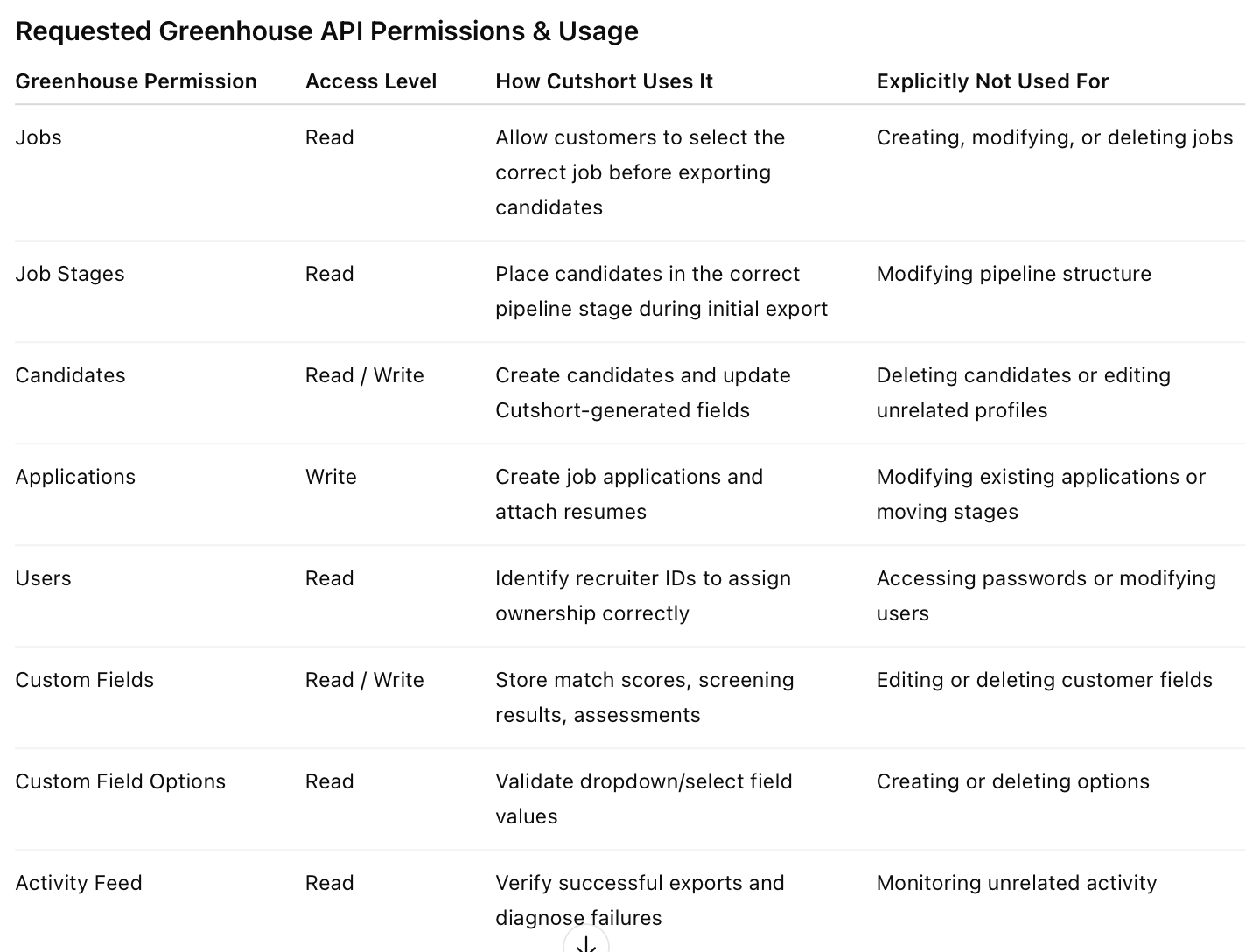
Here is exactly how we use each permission.
\*\*Step 2: \*\*Copy this API key and go to Job Pipeline of the job you want to setup export to ATS on Cutshort.
Enter this key. Choose the job you want to export candidates to and you are done.
\*\*Step 3: \*\*When a candidate moves to a specific stage in CutShort (based on your automation rules), we:
* Create/update the candidate in Greenhouse
* Create an application linking the candidate to your job
* Attach the candidate's resume
* Populate custom fields with match scores, assessments, and screening responses
* Assign the application to the correct recruiter
4. Verification: We verify the export was successful using activity feed data
**Our Commitment to Security**
We understand that granting API access to your Greenhouse account is an important security decision.
Read-only access where possible - We only request write permissions where necessary for core functionality
No unnecessary data access - We only access data required for exporting candidates
Secure credential storage - Your API keys are encrypted and stored securely
* Transparent operations You can see exactly what we're doing with each permission
Here is exactly how we use each permission.
 **Frequently Asked Questions**
Question: Can I revoke these permissions later?
Answer: Yes, you can revoke API access at any time from your Greenhouse Dev Center. This will stop future exports, but won't affect candidates already exported.
Question: Will this affect my existing Greenhouse workflows?
Answer: No, our integration only creates new candidates and applications. It doesn't modify your existing data or workflows.
Question: What happens if I don't grant all permissions?
A: The integration may not function correctly. For example, without "Applications" permission, we can't create the link between candidates and jobs.
Question: Can I see what CutShort is doing with my Greenhouse account?\*
A: Yes, all exports appear in your Greenhouse activity feed, and you can see all candidates and applications we create.
**Frequently Asked Questions**
Question: Can I revoke these permissions later?
Answer: Yes, you can revoke API access at any time from your Greenhouse Dev Center. This will stop future exports, but won't affect candidates already exported.
Question: Will this affect my existing Greenhouse workflows?
Answer: No, our integration only creates new candidates and applications. It doesn't modify your existing data or workflows.
Question: What happens if I don't grant all permissions?
A: The integration may not function correctly. For example, without "Applications" permission, we can't create the link between candidates and jobs.
Question: Can I see what CutShort is doing with my Greenhouse account?\*
A: Yes, all exports appear in your Greenhouse activity feed, and you can see all candidates and applications we create.